Files
Stalwart stores files as JMAP FileNodes, and Bulwark browses them. Documents and media end up in the same interface as the mail and the calendar, rather than in a separate app you have to remember to open.
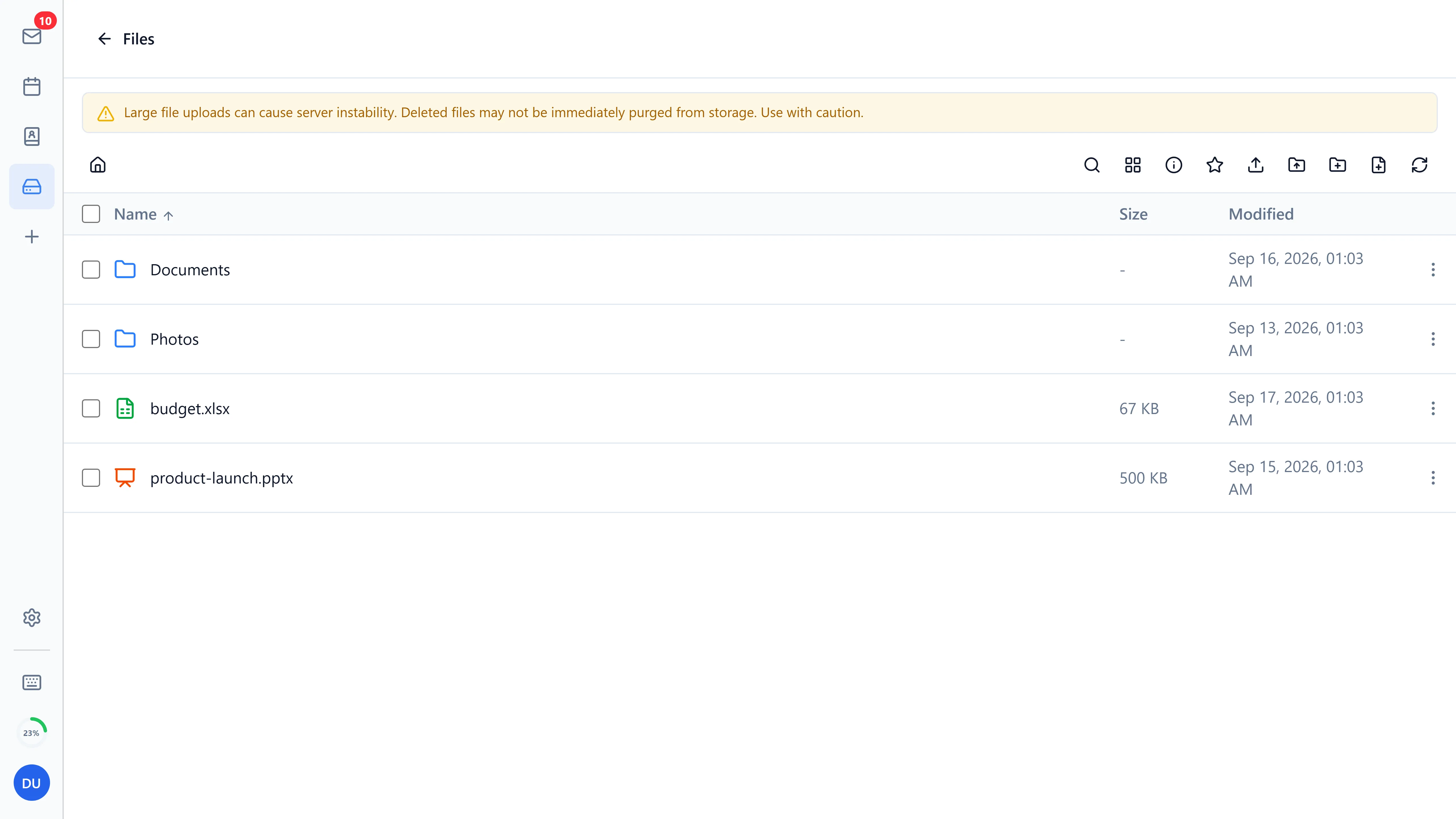
File browser
- Folder tree navigation with breadcrumb path over a real
FileNodehierarchy - Grid and list views
- Sorting by name, size, or date
- Favorites and recent files for quick access
- Bulk multi-select actions
- Right-click context menu
Upload and download
- Upload individual files with progress tracking
- Folder upload via drag-and-drop or toolbar button (recursive)
- Streamed WebDAV PUT - uploads stream straight to the server without buffering the file in memory, so multi-GB uploads work in browsers with limited memory
- Download files or entire selections
- Dynamic upload size limits read from the server's configuration so the UI knows what's allowed before you try
- Clipboard-style cut, copy, paste, and duplicate actions
- Drop zone fills the available viewport height for easy bulk drops
- Falls back to
application/octet-streamfor files with unusually long MIME types
Warning Stalwart's FileNode storage is still maturing. Very large uploads can occasionally cause server instability, and deleted files may not be immediately purged from storage. Use with caution in production deployments.
Preview
- Images (JPEG, PNG, WebP, GIF, SVG)
- Text (plaintext, source code with syntax highlighting)
- Audio
- Video
- PDF (in a sandboxed iframe with strict CSP)
Office documents
Word-processor, spreadsheet and presentation files open for editing in place when a WOPI-capable office server is configured. Collabora Online, OnlyOffice and EuroOffice are the ones the integration was written against. Set WOPI_CLIENT_URL to the editor's base URL (Bulwark fetches its discovery document from <url>/hosting/discovery) and, if the editor reaches the webmail on a different hostname than the browser does, WOPI_HOST_URL to the address it should use. Leave WOPI_CLIENT_URL empty and the feature is off. The demo fixtures include office documents so you can see the integration without uploading anything.
Sharing
Files and folders can be shared with other users or groups on the server (JMAP sharing, RFC 9670). Pick the principal, grant read, read/write or manager, and the item shows a shared indicator. Anything shared with you appears under Shared with me.
Organization
- Create, rename, move, and delete folders
- Files are stored as real
FileNoderecords in a nested hierarchy; folders are detected as blob-less nodes and listed viaFileNode/get - Legacy installs that stored files under flat, slash-encoded names are migrated into the proper folder hierarchy automatically on first load
- Quick metadata visibility for size and modified date
- Recent files prune themselves automatically when underlying nodes are deleted on the server
Integration
- Native JMAP FileNode support in Stalwart
- Unified authentication and permissions with the rest of Bulwark
- Per-account isolation when multiple accounts are connected
- Attachments and stored files sit one click apart, so moving between them doesn't mean changing apps